Quantum GIS software sets the stage for this enthralling narrative, offering a powerful platform that transforms the way we analyze and visualize geospatial data. With its rich feature set, Quantum GIS stands out in the realm of GIS, enabling users to delve into complex spatial relationships and generate insightful maps. The software’s journey from inception to its current robust framework reflects its commitment to innovation and community-driven development.
As you explore Quantum GIS, you will discover its intuitive interface, comprehensive data management capabilities, and a plethora of plugins that enhance functionality, making it a favorite among professionals and enthusiasts alike. Whether you’re engaging in urban planning or environmental analysis, Quantum GIS is equipped to meet diverse geospatial needs with ease.
Introduction to Quantum GIS Software
Quantum GIS (QGIS) is an open-source geographic information system (GIS) that enables users to visualize, manage, and analyze geospatial data. Its significance in geospatial analysis lies in its ability to handle diverse data types and its robust analytical capabilities, allowing for improved decision-making across various industries. QGIS stands out due to its user-friendly interface, extensive features, and active development community.
The historical development of QGIS began in 2002, evolving from a small project aimed at creating a free GIS alternative to a powerful tool widely adopted by professionals and researchers. Over the years, it has seen significant enhancements, including support for various file formats, sophisticated mapping tools, and a rich suite of plugins, solidifying its role as a critical asset in the GIS community.
Installation and Setup
Installing Quantum GIS is a straightforward process. Here’s a step-by-step guide:
- Visit the official QGIS website to download the latest version suitable for your operating system.
- Choose your operating system (Windows, macOS, or Linux) and follow the provided installation instructions.
- For Windows users, run the installer and follow the setup prompts.
- For macOS and Linux, you may need to use package managers or terminal commands as specified on the site.
To ensure optimal performance, it’s essential to meet the following system requirements:
- Minimum 4 GB RAM (8 GB recommended for heavy usage)
- At least 2 GB of available disk space
- Graphics card compatible with OpenGL 2.0
- Operating system: Windows 7 or higher, macOS 10.12 or higher, or a recent Linux distribution
Preparation can enhance the installation experience. Here’s a checklist of pre-installation configurations:
- Ensure your operating system is up to date.
- Disable any antivirus software temporarily to avoid installation issues.
- Backup any existing GIS projects if upgrading from an older version.
User Interface and Navigation
The Quantum GIS user interface is designed for intuitive navigation, featuring a main menu, toolbars, and a map canvas. Key components include:
- Main Menu: Contains all primary functions and tools.
- Toolbars: Quick access to frequently used tools for data manipulation and visualization.
- Map Canvas: Displays the current map view and allows users to interact with the data layers.
For new users, navigating the interface can be made easier with these tips:
- Utilize the ‘Help’ menu for tutorials and user documentation.
- Customize toolbars to include only the tools you frequently use.
- Experiment with the ‘View’ settings to optimize your workspace layout.
Customization options allow users to tailor the interface to their preferences. Users can adjust themes, button positions, and toolsets, ensuring a personalized and efficient working environment.
Core Functionalities
Quantum GIS excels in data management, supporting both vector and raster data. Users can easily import, edit, and analyze various data types including shapefiles, GeoJSON, and satellite imagery. The mapping tools available include:
- Symbology Options: Customize the appearance of layers with styles and color gradients.
- Layer Management: Organize and manage multiple data layers effectively for comprehensive analysis.
Spatial analysis can be performed using built-in tools such as:
- Buffer Analysis: Generate buffer zones around features to assess proximity.
- Overlay Analysis: Combine multiple layers to find relationships between datasets.
Plugins and Extensions
Plugins enhance the functionality of Quantum GIS significantly. Some popular plugins include:
- OpenLayers Plugin: Allows users to add background layers from various online sources.
- Processing Toolbox: Provides access to advanced geoprocessing tools.
- QuickMapServices: Facilitates the addition of base maps from multiple providers.
Installing and managing plugins is easy:
- Access the ‘Plugins’ menu and select ‘Manage and Install Plugins.’
- Search for desired plugins and click ‘Install.’
Using plugins can provide unique advantages over built-in features, offering specialized tools and extended capabilities for specific tasks.
Data Visualization Techniques, Quantum gis software
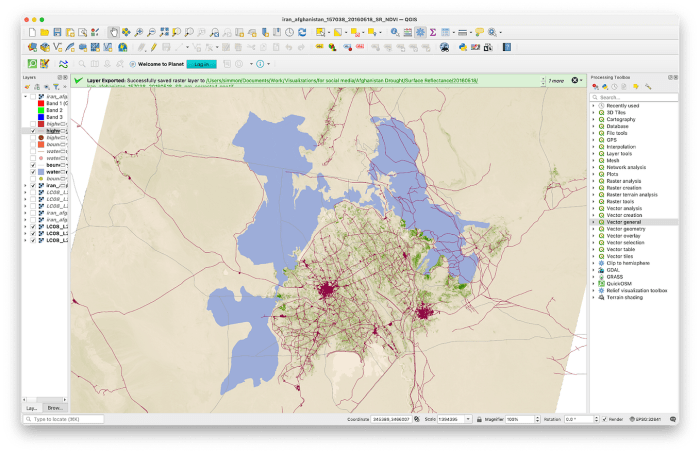
Creating thematic maps in Quantum GIS involves several methods. Users can employ various color schemes and legends to represent data visually. Advanced visualization techniques include:
- 3D Mapping: Utilize the 3D Map View to visualize terrain and data elevation.
- Animation: Create animated maps to show changes over time, enhancing storytelling.
Effective data presentation strategies can significantly impact decision-making. For instance, using clear legends and intuitive color schemes helps in communicating complex information.
Community and Support
The Quantum GIS community is vibrant and supportive. Users can seek help and share experiences through various online forums and social media groups. Key platforms include:
- QGIS User Mailing List
- GIS Stack Exchange for technical questions
- Dedicated QGIS forums on platforms like Reddit
A wealth of tutorials, webinars, and training resources are available to assist users in mastering the software. Contributing to the community not only aids personal growth but also enhances the software’s development, ensuring continuous improvement and innovation.
Case Studies and Applications
Quantum GIS has been effectively utilized across various fields, such as:
| Industry | Application |
|---|---|
| Urban Planning | Land use mapping and analysis |
| Environmental Management | Wildlife habitat analysis |
| Disaster Response | Emergency resource allocation |
The impact of Quantum GIS on decision-making processes is profound, providing crucial insights that shape policies and operational strategies in these sectors. Its ability to integrate complex datasets into actionable visualizations allows stakeholders to make informed choices effectively.