TeamViewer Remote Review: Professional IT Support and Access Analysis – TeamViewer Remote Review Professional IT Support and Access Analysis takes a deep dive into one of the leading remote access solutions available today. With a legacy that stretches back to its inception, TeamViewer has continually evolved to meet the needs of its diverse user base, which includes IT professionals, businesses, and individuals seeking reliable remote support. This review will explore its key features, user experience, and how it has positioned itself as a crucial tool for professional IT support.
From its robust functionality to its commitment to security, TeamViewer serves as a bridge for seamless remote assistance and collaboration. Whether you’re troubleshooting technical issues or providing comprehensive IT support, TeamViewer’s versatility and ease of use make it an essential service in today’s digital landscape.
Introduction to TeamViewer: TeamViewer Remote Review: Professional IT Support And Access Analysis
TeamViewer is a versatile remote access and control software that allows users to connect to devices from anywhere in the world. Its primary purpose is to facilitate remote desktop access, enabling IT professionals and individuals to support, manage, and control computers and servers as if they were right in front of them. Launched in 2005, TeamViewer has grown to become a leading solution in the remote support and collaboration market, evolving through continuous updates and the introduction of new features.
The software targets a wide range of users, including IT professionals, businesses of all sizes, and individuals seeking personal remote access solutions. TeamViewer is commonly used for remote technical support, online meetings, file sharing, and collaboration among teams, making it a valuable tool for enhancing productivity and efficiency in various environments.
Features of TeamViewer
TeamViewer is packed with features designed to provide robust remote access and support capabilities. Some key features include:
- Remote Control: Users can take control of remote devices to troubleshoot issues directly.
- File Transfer: Drag and drop files between local and remote devices seamlessly.
- Session Recording: Record remote sessions for training or auditing purposes.
- Multi-Platform Support: Compatible with Windows, macOS, Linux, iOS, and Android.
- Remote Printing: Print documents remotely from a connected printer.
The user interface of TeamViewer is designed to be intuitive and easy to navigate, ensuring that users can quickly access the necessary tools without a steep learning curve. The software’s dashboard presents clear options for initiating remote sessions, managing contacts, and accessing additional features.
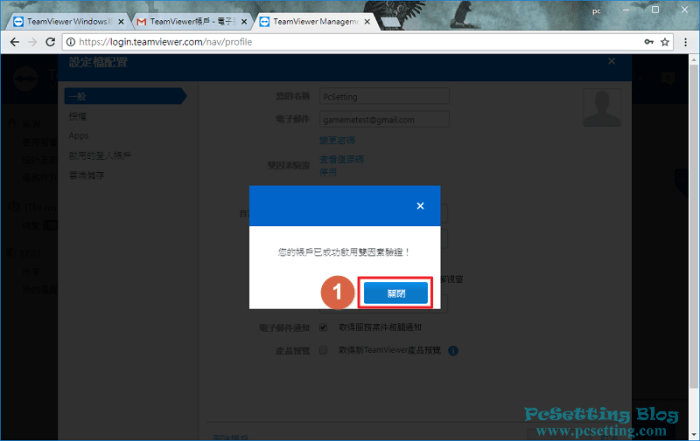
Security is a top priority for TeamViewer, which includes various integrated features such as end-to-end encryption, two-factor authentication, and a secure connection to guarantee the safety of user data during remote access sessions.
Professional IT Support with TeamViewer
TeamViewer significantly enhances professional IT support services by allowing technicians to diagnose and resolve issues remotely. This capability reduces the need for on-site visits, saving both time and resources. Many IT support teams utilize TeamViewer to provide real-time assistance, ensuring prompt resolutions to technical challenges.
For instance, a notable case involved a large financial institution that leveraged TeamViewer to support its remote workforce during the pandemic. By using TeamViewer, IT staff could quickly assist employees with technical problems, maintaining productivity without the need for physical presence.
TeamViewer also integrates seamlessly with other IT support tools, such as ticketing systems, which further streamlines the support process. This integration allows for efficient management of support requests and enhances the overall user experience.
Remote Access Capabilities, TeamViewer Remote Review: Professional IT Support and Access Analysis
TeamViewer’s remote access capabilities are robust, facilitating connections to devices regardless of their location. This feature is crucial for businesses that have employees working remotely or across multiple sites. Users can access their work computers or servers from home, ensuring continuity in work processes.
When comparing TeamViewer’s remote access features with those of competitors, such as AnyDesk and LogMeIn, TeamViewer stands out for its comprehensive feature set and reliability. Users appreciate its ability to maintain a stable connection even in low-bandwidth environments, a significant advantage for remote troubleshooting.
Setting up remote access through TeamViewer is straightforward; users simply need to install the software, generate a unique session ID, and share it with their support team or access it themselves. This simplicity reduces the barriers to effective remote support.
Pricing and Subscription Models
TeamViewer offers a range of pricing structures to accommodate different user needs. Its subscription models include options for individuals, small businesses, and larger enterprises, allowing users to choose a plan that suits their requirements and budget.
The pricing typically includes:
- Single User License: Designed for individual use, ideal for freelancers.
- Business License: Geared towards small to medium-sized businesses requiring multiple concurrent sessions.
- Premium License: For larger organizations needing advanced features and additional users.
TeamViewer also provides a free trial, allowing potential users to explore the software’s capabilities before committing to a subscription. This option is particularly appealing for businesses looking to evaluate different solutions without incurring initial costs.
User Feedback and Reviews
User feedback on TeamViewer’s performance is generally positive, with many appreciating its reliability and ease of use. Positive reviews often highlight the software’s efficiency in resolving technical issues remotely, as well as its user-friendly interface.
Common themes in user reviews include:
- Positive: Reliable connection and quick response times.
- Negative: Occasional connectivity issues and pricing concerns for small businesses.
- Neutral: Mixed experiences regarding customer support responsiveness.
Overall, TeamViewer receives commendations for its effectiveness as a remote access tool, though some users express concerns about cost and customer service.
Troubleshooting and Support Resources
Users of TeamViewer occasionally encounter common issues, such as connectivity problems or software incompatibilities. To assist users in resolving these challenges, TeamViewer provides extensive resources and documentation, including:
- Knowledge Base: A comprehensive online repository of articles and guides.
- Community Forums: A platform for users to discuss issues and share solutions.
- Customer Support: Direct support options for premium users.
These resources empower users to troubleshoot effectively and find solutions to their problems quickly.
Future Developments and Updates
As technology evolves, TeamViewer is anticipated to introduce new features and updates that enhance its functionality. Upcoming improvements may focus on expanding integrations with other software tools and enhancing mobile access capabilities.
User feedback plays a crucial role in shaping the future of TeamViewer, with requests for features such as enhanced reporting tools and improved collaboration functionalities being regularly considered. As the tech landscape continues to change, TeamViewer aims to stay at the forefront of remote support solutions, ensuring it meets the evolving needs of its users.