Canon PIXMA G7020 Printer – Office Hardware Review invites you to discover a powerful and versatile printing solution designed for modern offices. This all-in-one printer combines advanced technology with seamless usability, catering to various professional needs. With its robust features and efficient performance, the G7020 stands out as an ideal choice for those seeking reliability and quality.
From its detailed descriptions of features to impressive specifications, the Canon PIXMA G7020 is built to enhance productivity in any workspace. Featuring a sleek design and sturdy build quality, it appeals to a wide range of users, whether in a bustling corporate environment or a small home office.
Overview of the Canon PIXMA G7020 Printer
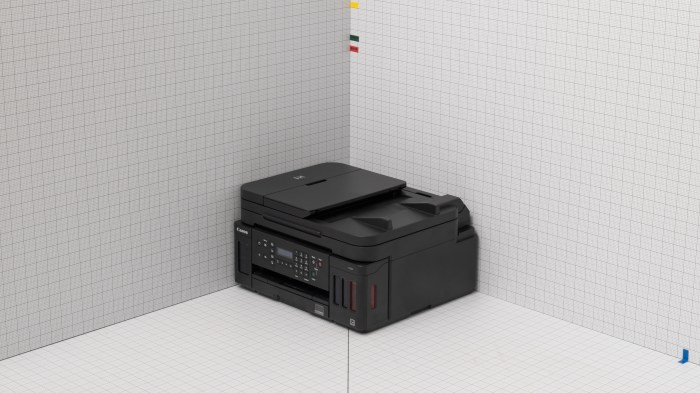
The Canon PIXMA G7020 is a versatile all-in-one printer designed for office settings that require reliable performance and high-quality output. With a focus on cost efficiency, this printer features a robust ink tank system that significantly reduces the overall cost of printing. Its sleek design with a compact footprint makes it suitable for various office environments, ensuring it fits comfortably on any desk or workspace.
Features and Specifications
The Canon PIXMA G7020 comes packed with a variety of features that cater to both home and small business users. Key specifications include:
- Print Resolution: Up to 4800 x 1200 dpi for vivid color reproduction.
- Print Speed: Black and white prints at approximately 13 pages per minute and color prints at around 10 pages per minute.
- Connectivity: Wireless, USB, and Ethernet options for seamless integration into any office network.
- Functionality: Print, scan, copy, and fax capabilities, making it a true all-in-one solution.
- Paper Handling: Automatic document feeder (ADF) with a capacity of 35 sheets for faster multi-page copying and scanning.
Design and Build Quality
The design of the Canon PIXMA G7020 is both functional and aesthetically pleasing, featuring a minimalist look that complements modern office decor. The build quality is solid, ensuring durability and longevity even with regular use. Its compact design, along with a simplified control panel, allows for easy operation and quick access to essential functions.
Target Audience
The Canon PIXMA G7020 is ideal for small businesses, home offices, and educational institutions that require efficient and high-volume printing. Its cost-effective ink system and multifunction capabilities make it suitable for a variety of office environments, enhancing productivity without compromising quality.
Performance and Print Quality
The performance of the Canon PIXMA G7020 stands out in its category, providing fast and efficient printing solutions for everyday office needs.
Print Speed and Efficiency
With a print speed of up to 13 pages per minute for black and white documents and approximately 10 pages per minute for color prints, the G7020 is designed for high productivity. This efficiency ensures that users can handle large print jobs without unnecessary delays.
Quality of Prints
The print quality of the G7020 is exceptional, producing crisp black-and-white text and vibrant color images. Whether printing reports, presentations, or high-resolution photos, users can expect professional results that meet their expectations.
Comparison with Other Printers
When compared to other printers in its category, such as the HP EcoTank series and Epson EcoTank printers, the G7020 offers competitive print speeds and superior print quality, making it an excellent choice for office scenarios requiring both speed and clarity.
Ink System and Cost Efficiency
The Canon PIXMA G7020 utilizes an innovative ink tank system that offers significant advantages over traditional cartridge systems.
Ink Tank System Advantages
The ink tank system allows users to print thousands of pages before needing a refill, drastically reducing the frequency and cost of ink replacements. This feature is particularly beneficial for businesses that rely heavily on printing.
Cost Per Page and Ink Consumption
Analyses of the cost per page indicate that the G7020 provides one of the lowest costs in its class. Users can expect an average cost of less than a cent per page for black and white prints and only a few cents for color prints, making it highly economical for high-volume printing.
Maximizing Ink Efficiency
To maximize ink efficiency, users can take advantage of the printer’s draft mode for less critical prints and utilize double-sided printing to reduce paper usage. Regular maintenance and properly managing print settings can also contribute to lower ink consumption.
Connectivity and Compatibility
The Canon PIXMA G7020 excels in connectivity options, making it suitable for various office setups.
Connectivity Options
This printer supports multiple connectivity options, including:
- Wi-Fi and Ethernet for wired and wireless networking.
- USB connection for direct printing from computers.
- Mobile printing capabilities via Canon’s PRINT app, Google Cloud Print, and Apple AirPrint.
Compatibility with Operating Systems
The G7020 is compatible with a wide range of operating systems, including Windows, macOS, and various mobile platforms, ensuring that users can seamlessly integrate the printer into their existing systems.
Ease of Setup, Canon PIXMA G7020 Printer – Office Hardware Review
Setting up the Canon PIXMA G7020 is straightforward, with user-friendly instructions that guide users through the process. The wireless setup is particularly convenient, allowing for quick integration into home or office networks.
Unique Features and Functions: Canon PIXMA G7020 Printer – Office Hardware Review
The Canon PIXMA G7020 offers several unique features that enhance productivity and ease of use in office environments.
Duplex Printing and Mobile Printing Capabilities
The G7020 includes automatic duplex printing, which saves time and paper. Additionally, its mobile printing capabilities enable users to print directly from their smartphones and tablets, streamlining workflows and increasing efficiency.
Enhancing Productivity
These features empower teams to complete tasks more quickly and efficiently, reducing downtime and ensuring that projects remain on schedule. The convenience of mobile printing, combined with duplex capabilities, makes the G7020 a valuable asset in busy office settings.
User Experience and Feedback
User testimonials reflect a high level of satisfaction with the Canon PIXMA G7020, particularly regarding its performance and print quality.
User Testimonials and Reviews
Many users praise the printer for its reliability and cost-effectiveness. Feedback often highlights the impressive print quality and the attractive price point of ink refills.
Common Issues and Solutions
While users have encountered minor issues such as paper jams or connectivity glitches, most can be easily resolved by following troubleshooting guides provided by Canon. Regular maintenance helps prevent these problems from becoming frequent.
User Ratings Comparison
| Review Platform | User Rating |
|---|---|
| Amazon | 4.5/5 |
| Best Buy | 4.6/5 |
| CNET | 4/5 |
Maintenance and Support
Proper maintenance of the Canon PIXMA G7020 is essential for ensuring optimal performance and longevity.
Maintenance Tips
Regularly cleaning the print head and checking for firmware updates can enhance the printer’s performance. Users are encouraged to follow Canon’s maintenance guidelines to avoid common issues and prolong the life of the printer.
Support Options
Canon provides various support options, including online resources, customer service hotlines, and warranty information. Users can easily access troubleshooting guides and FAQs through Canon’s official website.
Comparison with Similar Printers
When comparing the Canon PIXMA G7020 with similar printers, it’s clear that there are distinct advantages.
Comparison of Features and Performance
The G7020 competes well against other all-in-one printers, such as the Epson EcoTank ET-4760 and HP Smart Tank Plus 651. Here is a table summarizing key differences:
| Feature | Canon PIXMA G7020 | Epson EcoTank ET-4760 | HP Smart Tank Plus 651 |
|---|---|---|---|
| Print Speed (B/W) | 13 ppm | 15 ppm | 12 ppm |
| Cost per Page (B/W) | $0.01 | $0.02 | $0.01 |
| Duplex Printing | Yes | Yes | No |
| Mobile Printing | Yes | Yes | Yes |
Best Use Cases for Each Printer
While the Canon PIXMA G7020 is ideal for users requiring high-volume printing with low running costs, the Epson EcoTank ET-4760 offers slightly better speed, making it suitable for environments with extremely demanding print requirements. The HP Smart Tank Plus 651, although competitive, may not match the printing efficiency of the other two options, but it still serves well for moderate printing needs.