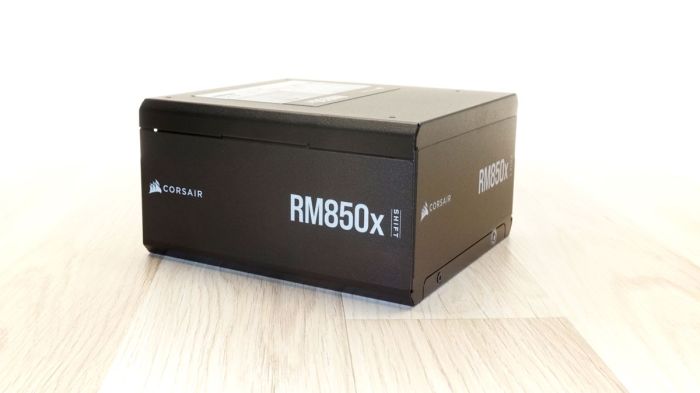
Corsair RM850x Power Supply – PSU Hardware Guide opens the door to unparalleled performance and reliability, designed for gamers and professionals alike. This power supply is not just a component; it’s the backbone of your PC, ensuring stable and efficient power delivery. With its cutting-edge technology and robust build quality, the RM850x is tailored for high-demand setups, providing peace of mind whether you’re gaming or working on extensive projects.
Key features like fully modular cables and an impressive efficiency rating set the RM850x apart, making it compatible with a variety of systems while simplifying installation. Dive into a world where power meets precision and discover how the Corsair RM850x can elevate your computing experience.
Overview of the Corsair RM850x Power Supply: Corsair RM850x Power Supply – PSU Hardware Guide
The Corsair RM850x is a high-performance power supply unit (PSU) that stands out in the crowded market of computer hardware. With an 850-watt capacity, this unit is designed to provide stable and reliable power for both gaming and workstation builds. It features a fully modular design, allowing users to connect only the cables they need for a cleaner and more efficient setup. The RM850x is 80 PLUS Gold certified, which means it delivers high energy efficiency, ensuring less power waste and lower electricity bills.
Key features of the Corsair RM850x include ultra-low noise operation thanks to its 135mm fan equipped with Zero RPM mode, where the fan does not spin at low loads. Additionally, it is designed with high-quality capacitors that improve voltage regulation and stability. The RM850x is compatible with a wide range of components, including high-end graphics cards and motherboards, making it an excellent choice for gamers and professionals seeking performance without compromise.
Installation Guide for the Corsair RM850x
Installing the Corsair RM850x is a straightforward process that can be completed with minimal tools. To ensure a smooth installation, follow these steps:
- Gather necessary tools: You’ll need a Phillips screwdriver, cable ties for organization, and possibly a flashlight for visibility.
- Turn off and unplug your PC, grounding yourself to prevent static discharge.
- Open your PC case and locate the power supply mounting area.
- Carefully remove any existing power supply, ensuring to disconnect all cables.
- Position the RM850x in the mounting area, aligning it with the screw holes.
- Screw the power supply into place securely.
- Connect the necessary power cables to your motherboard, CPU, and graphics card, ensuring to use the modular cables only as needed.
- Organize cables with ties for airflow and neatness.
- Close your PC case and plug it in.
- Power on the system and verify all components are functioning correctly.
Before powering on, check the following components:
- All power connections to the motherboard and peripherals.
- Secure mounting of the PSU in the case.
- No loose cables obstructing fans or airflow.
- Proper seating of RAM and other components.
Performance Analysis of the RM850x
The Corsair RM850x boasts impressive efficiency ratings, achieving 80 PLUS Gold certification with an efficiency level of up to 90% at typical loads. This translates to lower power consumption and heat generation, enhancing the longevity of your components.
In comparison to other power supplies in the same wattage range, the RM850x stands out for its voltage stability and thermal performance. Here’s a quick performance breakdown:
| Metric | Corsair RM850x | Competitor A | Competitor B |
|---|---|---|---|
| Voltage Stability | ±1% | ±2% | ±3% |
| Efficiency | 90% (Rated at 50% load) | 88% | 85% |
| Thermal Performance | Low noise under load | Moderate noise | High noise |
Features and Technologies
One of the standout features of the RM850x is its fully modular cable management system. This allows users to use only the cables they need, reducing clutter and improving airflow within the case. The modular design also simplifies upgrades and replacements.
High-quality capacitors and advanced fan technology play a crucial role in the RM850x’s performance. The use of 105°C rated capacitors ensures long-lasting reliability, while the fan operates quietly under low loads, enhancing the overall user experience.
Additionally, Corsair Link software offers real-time monitoring of power supply performance, including fan speeds, voltages, and overall system health, giving users comprehensive insights into their setup.
Troubleshooting Common Issues, Corsair RM850x Power Supply – PSU Hardware Guide
While the Corsair RM850x is designed for reliability, users may encounter some common installation issues. Here are some potential problems and their solutions:
– Issue: PC does not power on.
– Solution: Double-check all power connections and ensure the power supply switch is turned on.
– Issue: Noisy operation.
– Solution: Ensure the fan is unobstructed and that the PSU is installed correctly.
– Issue: System instability or crashes.
– Solution: Verify that all components are properly seated and that the PSU is supplying sufficient wattage.
For users experiencing problems, consider these troubleshooting tips:
- Recheck all connections before turning on the system.
- Review the PSU installation guide to ensure proper setup.
- Test the unit with minimal components to isolate issues.
User Reviews and Feedback
User experiences with the Corsair RM850x are predominantly positive, with many praising its performance and reliability. Feedback from various platforms highlights the following recurring themes:
– Performance: Users consistently note the RM850x’s stability during intense gaming and multitasking scenarios.
– Noise Level: Many appreciate the quiet operation, particularly under light loads due to the Zero RPM fan mode.
– Build Quality: Customers have expressed satisfaction with the high-quality materials and design of the unit.
The warranty and customer support provided by Corsair further enhance user satisfaction, with many users reporting positive experiences with support when troubleshooting issues.
Comparison with Competitors
When comparing the RM850x with similar models from other manufacturers, several factors come into play, including price, features, and performance. The following table highlights the pros and cons of each model:
| Model | Pros | Cons |
|---|---|---|
| Corsair RM850x | High efficiency, fully modular, quiet operation | Higher price |
| Competitor A | Lower price, good performance | Less efficient, non-modular |
| Competitor B | Budget-friendly, decent features | Higher noise levels, lower build quality |
Future Trends in Power Supply Technology
The power supply industry is witnessing several emerging technologies that may influence future models, including advancements in efficiency standards and the use of innovative materials. As the demand for energy-efficient components grows, manufacturers are expected to adopt stricter efficiency ratings, potentially pushing the boundaries of power supply capabilities.
Predictions suggest that future PSUs will leverage advancements in semiconductor technology, possibly integrating AI to optimize power delivery and thermal management. New materials, such as graphene, may also enhance performance and heat dissipation, leading to even more compact and efficient designs.
These trends will not only improve the performance of power supplies like the Corsair RM850x but also contribute to the overall sustainability of computer hardware, aligning with the growing focus on energy efficiency and environmental responsibility.