Video studio software is at the forefront of a creative revolution, empowering users to produce stunning visual content with ease. Whether you are a beginner or a seasoned professional, these tools offer an array of features that simplify the video editing process, transform your raw footage, and bring your creative vision to life. Discover the various types of video studio software available, from intuitive platforms to advanced editing suites tailored for every user’s unique needs.
Explore popular options in the market, understand their key features, and learn how to maximize the potential of these software solutions for your projects.
Overview of Video Studio Software
Video studio software is an essential tool for anyone looking to create high-quality video content. These software applications allow users to edit, organize, and enhance their video footage, making it easier to produce professional-looking results. With a range of features tailored to different skill levels and project requirements, video studio software caters to filmmakers, content creators, educators, and marketers alike.
Various popular video studio software options are available on the market today. Examples include Adobe Premiere Pro, Final Cut Pro, and DaVinci Resolve. Each of these applications offers unique features and tools that cater to specific editing styles and user preferences. Additionally, there are different types of video studio software designed for various needs, such as beginner-friendly options, advanced editing platforms, and specialized tools for animation or visual effects.
Key Features to Look For
When selecting video studio software, it is crucial to consider several key features that enhance the editing experience. Essential features include:
- User-friendly interface: A smooth and intuitive interface facilitates easier navigation and quicker learning, especially for beginners.
- Comprehensive editing tools: Look for software that offers trimming, splitting, and merging options, as well as the ability to add transitions and effects.
- Audio editing capabilities: Quality sound is just as important as video; features like audio mixing and noise reduction improve overall production quality.
The importance of a user-friendly interface cannot be understated. A well-designed layout enables users to focus on creativity rather than struggling with complicated navigation. Moreover, effective editing tools and effects significantly enhance the quality of the final product, making it essential to choose software that provides a range of options for customization and refinement.
Comparison of Various Video Studio Software
To aid in the decision-making process, a comparison table highlighting features of top video studio software can be valuable. Here is a brief overview of some leading options:
| Software | Main Features | Pricing Model | User Ratings |
|---|---|---|---|
| Adobe Premiere Pro | Multi-track editing, extensive effects library, cloud integration | Subscription-based ($20.99/month) | 4.7/5 |
| Final Cut Pro | Magnetic timeline, advanced color grading, 360-degree video editing | One-time purchase ($299.99) | 4.8/5 |
| DaVinci Resolve | Professional-grade color correction, audio post-production tools | Free version & $299 one-time purchase for Studio version | 4.6/5 |
User reviews and ratings can provide insights into the strengths and weaknesses of each software option, helping users make informed choices based on their specific needs and experiences.
Best Practices for Video Editing
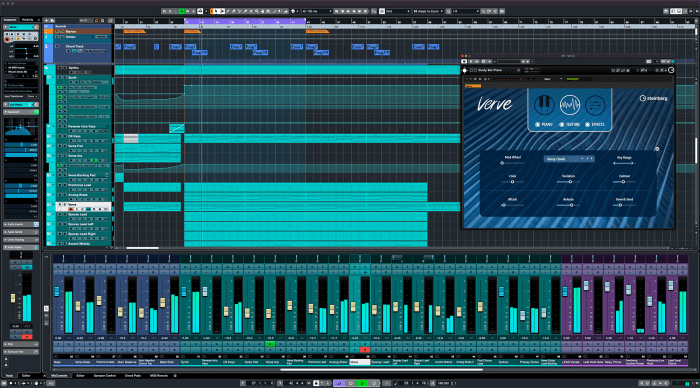
Efficient video editing requires a well-organized workflow. Here are some best practices to enhance productivity:
- Organize video clips: Create a structured folder system on your computer to categorize footage based on scenes, themes, or dates.
- Use markers and labels: Mark important sections in your timeline to quickly identify critical edits or transitions.
- Enhance video quality: Utilize color correction tools and ensure proper lighting adjustments to improve visual appeal.
- Optimize sound: Apply audio filters to reduce background noise and balance sound levels for a polished final product.
These practices not only streamline the editing process but also enhance the quality of the final video output, ensuring a more professional result.
Advanced Features and Tools
Advanced video studio software often includes specialized features that elevate the editing process. Color grading and correction tools play a pivotal role in setting the mood and tone of the video. These features allow for adjustments in color balance, brightness, and contrast, leading to visually stunning results.
Moreover, the incorporation of motion graphics and animation capabilities provides an extra layer of creativity. Users can add dynamic elements to their videos, enhancing the storytelling aspect. Additionally, effective audio editing tools enable precise adjustments to sound, ensuring that the audio complements the visual elements seamlessly.
Target Audience and Use Cases, Video studio software
Video studio software caters to a diverse audience that includes filmmakers, marketers, educators, and content creators. Each group utilizes the software for specific projects that benefit from video editing capabilities.
- Filmmakers: Use the software to edit feature films, documentaries, and short films.
- Marketers: Create promotional videos, advertisements, and social media content.
- Educators: Develop instructional videos and online courses to enhance learning experiences.
Understanding the unique needs and use cases for video studio software in different industries helps in selecting the right tool for specific projects.
Future Trends in Video Studio Software
As technology continues to evolve, video editing software is increasingly integrating emerging technologies such as AI and machine learning. These advancements can automate certain editing processes, making video creation faster and more efficient.
Cloud-based solutions are also transforming video editing by enabling remote collaboration. Teams can work together on projects from different locations, streamlining the editing process and increasing productivity. Additionally, the potential for collaboration tools within video studio software promotes an interactive editing experience, allowing multiple users to contribute to a project simultaneously.
Getting Started with Video Studio Software
To begin using video studio software effectively, follow these steps:
- Install the software: Download and install the desired video studio software on your computer.
- Initial configurations: Set up preferences such as project settings, file organization, and shortcut keys for efficient editing.
- Access tutorials: Familiarize yourself with essential tools by exploring online tutorials and resources.
By following these initial steps, users can quickly adapt to the software and begin creating high-quality video projects.



