Autodesk AutoCAD Architecture Design Software takes center stage as a revolutionary tool that transforms the architectural design process. With its cutting-edge features and intuitive user interface, this software allows architects and designers to bring their visions to life with unparalleled precision and efficiency. Over the years, it has evolved into a powerhouse of functionality, integrating building information modeling (BIM) to enhance collaboration and streamline workflow.
From its rich history of development to its current capabilities, Autodesk AutoCAD Architecture empowers users to create stunning residential and commercial designs. This software is not just a tool; it’s a comprehensive solution designed to meet the demands of modern architecture.
Overview of Autodesk AutoCAD Architecture Design Software
Autodesk AutoCAD Architecture is a specialized version of the renowned AutoCAD software, designed specifically for architects and architectural designers. This innovative software integrates traditional AutoCAD tools with features tailored to the unique demands of architectural design and documentation. Over the years, Autodesk AutoCAD Architecture has evolved significantly, adapting to the changing landscape of architectural practices and technology.
The initial releases focused on enhancing architectural workflows, and as technology advanced, so did its functionalities. Today, it includes advanced features such as automatic dimensioning, design visualization, and detailed drawing management. Its user interface is intuitive, allowing architects to navigate seamlessly through various tools and options, significantly improving their design workflows.
Key Features and Tools
Autodesk AutoCAD Architecture boasts an extensive set of tools that streamline the architectural design process. These core features include:
- Architectural Objects: Create and manipulate walls, doors, windows, and roofs with ease, ensuring that the designs adhere to real-world standards.
- Dynamic Blocks: Use intelligent blocks that adjust based on user specifications, enabling rapid design modifications.
- Annotation Tools: Automatically generate annotations, labels, and dimensions, ensuring accurate documentation.
- Building Information Modeling (BIM): Integrate BIM capabilities that allow for comprehensive data management and project visualization.
These tools enhance architectural design by allowing for quicker revisions, improved accuracy, and greater collaboration among teams. The integration of BIM is particularly vital, as it facilitates the sharing of information across various stakeholders, enhancing communication and efficiency in project delivery.
Benefits for Architects and Designers
Autodesk AutoCAD Architecture significantly improves design efficiency by automating repetitive tasks and providing powerful design tools. Architects can spend less time on manual documentation and more time on creative design, leading to innovative architectural solutions.
Collaboration is another key advantage, as the software enables multiple project stakeholders to work on shared files in real-time. This fosters teamwork and reduces the likelihood of errors during the design process. Numerous case studies have showcased successful projects completed using Autodesk AutoCAD Architecture, demonstrating its impact on design quality and efficiency.
Compatibility and Integration, Autodesk AutoCAD Architecture Design Software
Autodesk AutoCAD Architecture is designed to work harmoniously with a variety of other software. It integrates seamlessly with other Autodesk products such as Revit and Navisworks, allowing for a cohesive workflow across different design phases.
File compatibility is crucial, as the software supports a wide range of file formats, facilitating easy import and export of designs. This compatibility ensures that architects can collaborate with other professionals using different software without hindrance.
Learning and Support Resources
For those new to Autodesk AutoCAD Architecture, a wealth of online courses and tutorials are available, catering to various skill levels. Resources such as Autodesk’s own training programs, platforms like LinkedIn Learning, and YouTube channels provide comprehensive guidance for beginners.
Community forums and user groups also thrive, offering a platform for users to share experiences, troubleshoot issues, and exchange best practices. These resources enhance the learning experience, ensuring users can maximize the software’s potential.
Trends and Future Developments
Emerging trends in architectural design software, including increased automation and enhanced visualization capabilities, are shaping the future of tools like Autodesk AutoCAD Architecture. The use of artificial intelligence and machine learning is anticipated to streamline processes further, offering predictive design analytics.
Future updates of Autodesk AutoCAD Architecture may include enhancements in cloud collaboration and increased integration with other design technologies. When compared to competitors in the market, Autodesk continues to lead through continuous innovation and user-focused improvements.
Practical Applications in Real-World Scenarios
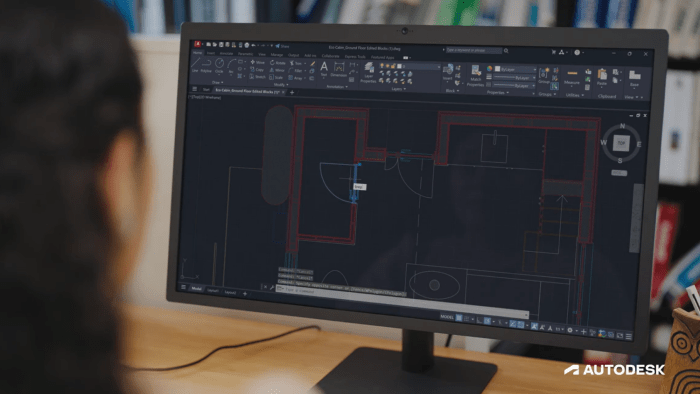
Using Autodesk AutoCAD Architecture for residential designs involves creating detailed floor plans, elevations, and sections. The software’s tools allow for quick adjustments and 3D modeling, enhancing visualization for clients.
For commercial building layouts, architects can efficiently manage space planning, compliance with building codes, and create detailed renderings that aid in stakeholder presentations. Large-scale projects see significant benefits from Autodesk’s capabilities, allowing for sophisticated project management and coordination across multiple teams.
User Experiences and Testimonials
User testimonials highlight a range of experiences with Autodesk AutoCAD Architecture. Many users praise its intuitive interface and powerful tools that simplify complex design tasks. Feedback regarding usability often emphasizes the quick learning curve, especially for those familiar with AutoCAD.
Performance reviews indicate that both novice and experienced users find the software to be reliable, though experienced users often leverage advanced features more effectively. Overall, the testimonials reflect a strong user satisfaction, attributing their successful projects to the capabilities of Autodesk AutoCAD Architecture.